Showing posts with label website. Show all posts

Friday, October 31, 2014

Tips for Promoting Your Mobile App, Part 1: Encouraging Downloads When Patrons Are Off-Site

One of the questions our partners frequently ask is, "How should we promote our app?"  To help you answer that question, we decided to provide you with some tips.  However, there is so much information that we had to break it into two separate posts.

We'll start with tips for how to promote your app when the patrons are not at one of your events.

8 Tips for promoting downloads when the audience is not at your event or performance


1.  Encourage mobile users who visit your website to download your app.  Makes sense right?  They are already on their mobile devices, so you should take the opportunity to direct them to your app.  Here are two ways you can do this:
Silk Road Rising uses the
mobile redirect script to
send mobile users visiting
their website to the mobile
web version of their app.

  • If you do not have a mobile responsive website or separate mobile site, be sure to use InstantEncore's mobile redirect script. (click here for how-to video)
    • This will redirect mobile users from your standard website to the mobile web version of your app.
    • It will also detect if the mobile user is on an Apple or Android device and present them with a prompt at the top of the screen to download your app on their device.
  • If you do have a mobile responsive site or separate mobile site, feature a notice for your mobile app on the home screen.
    • Provide a short message highlighting what additional features they will have access to by downloading the app.
    • Add the icon for your app to the screen.
    • Link the icon to your app's Smart App Download URL.
    • Instruct the user to tap on the icon to download the app.

2.  Encourage desktop/laptop users who visit your website to download your app.  This one might not be as obvious as the first one.  With the rapid rise of smartphone and tablet users, the probability is strong that people who visit your website on their desktop and laptop computers are also mobile users.  So why not encourage them to download your app? Here are two suggestions:
  • Add mobile app download buttons to your home screen.  
  • Austin Symphony Orchestra uses buttons on their website to
    encourage visitors to download their mobile app.
    • Add a button for both your Apple mobile app and your Android app.
    • Buttons for:  Android  |  Apple
    • Link the button to its appropriate URL.
    • To find the web link for each of your apps:
      • Go to www.instantencore.com
      • At the top where it says "Search or Redeem," enter the name for you or your organization.
      • "Search or Redeem" field on the InstantEncore site.
      • Find and click on your account name to go to your InstantEncore profile.
      • Clicking on the image for your mobile app gives you a drop-down menu with links to your Android and Apple URLs.
Links to Seattle Shakespeare Company's Android and Apple
apps in their InstantEncore profile.

3.  Create a video to spotlight your app.  While this may sound difficult, it really isn't.
  • Decide which features you want to mention and which ones you want to show in use.
  • Write out a script for the video.
  • Consider recruiting one of your artists to be video spokesperson for the app.
  • Practice going through the script while interacting with your device.  
  • Get a sense of how long it takes you to go through the script.  You should be able to highlight the more exciting features in a 1 to 2 minute video.
  • For example: here's an informative and funny video for the 2011 YouTube Symphony mobile app featuring flutist Nina Perlove:

  • At the end of your video, include the Smart App Download URL as the closing image.
  • Upload the video to YouTube - be sure to put the Smart App Download URL in the video's description.
  • Post it everywhere -- embed the video on your website or blog; share it on social media; link to it in email newsletters; etc.

4.  Feature the app prominently in your email communications.  
  • Spotlight your app in e-newsletters, subscriber emails, pre-show emails to ticket holders, etc.

    Email example from Curtis Institute of Music.
  • Be sure to mention your mobile app in confirmation emails for online ticket sales and/or reservations.
  • Include a brief description of your app's features as well as a link to the Smart App Download URL.

5.  Spotlight your app on the back of printed tickets and/or ticket envelopes.
  • Include the app logo and a brief description of the app's value.
  • Highlight the Smart App Download URL.
  • Add a QR Code linked to the Smart App Download URL. (click here for how-to video)

6.  Highlight your app on printed promotional pieces for your events and season.
  • Feature your mobile app and its features in your season brochure.
  • Mention your mobile app and its value in your event postcards, posters, and flyers.
  • Include the app logo, the Smart App Download URL, and/or QR Code.

7.  Alert your social media followers to your app.
  • On a regular basis, post screenshots from your app to highlight new content available in your app.
  • Include a link to the Smart App Download URL. 

8.  Use your App Store Description to highlight its features.  It's not enough to simply send patrons to your app's URL on iTunes or Google Play.  Once they are there, you need to communicate why they should download the app.


In Part 2 of this blog series, we will focus on tips for encouraging app downloads when your patrons are attending your event or performance.

Questions?  Contact us at support@instantencore.com

Tuesday, April 17, 2012

Promoting Your Mobile App Just Got Easier

Recently, InstantEncore updated our mobile package to provide an added dimension of auto-detection which helps our partners to streamline their efforts to promote their mobile apps.

Now when someone visits your standard website, it will not only detect if the visitor is coming from a mobile device, but it will also determine what type of mobile device the visitor is using.

  • If the mobile visitor is using an Android or Apple device, they will be presented with a screen which gives them with two choices:  (1) download the app, or (2) continue to the mobile website.
  • If the mobile visitor is using any other type of mobile device, they will be taken directly to the mobile website.
The major implication for this update is that you no longer need to promote your mobile offerings with separate messaging.  No need to direct mobile users to the Apple or Android app stores.  Simply direct your audience to visit to your standard web address on their mobile device, and InstantEncore will handle the rest.

To ensure that your mobile package is integrated with your standard website in this manner, take a moment to complete these steps:
  1. Log into your InstantEncore account
  2. Select "Manage Mobile"
  3. Go to "Mobile Web Setup" in the menu on the left
  4. Copy the snippet of code provided in the area marked "Set up your website to recognize mobile devices"
  5. Paste this code into <head></head> area of your website's HTML code
    (...or have your trusty website manager do it for you.)

Tuesday, March 27, 2012

Kickstarting your InstantEncore Website

Kickstarter has rapidly become one of the most important new sources of funding for Artists and Arts Organizations. Overall, Kickstarter has had over $150 million pledged to help fund projects already, and they are only growing. Crowd-sourcing your funding is also a solid way to help grow your Fan base by giving those who could never sponsor an entire event or recording on their own a chance to be a part of the process.  You can create a stronger connection with them as more than just audience members, but as Partners. With that it mind, it only makes sense to look for the best ways to integrate Kickstarter into your own InstantEncore powered services.

Website
Available to both Free and Pro accounts for Artists and Ensembles, your Website is your home on the internet. While it is of paramount importance to promote direct links to your Kickstarter page via social media such as Facebook and Twitter, no Kickstarter campaign would be complete without the information displayed prominently on your Website as well. New Fans will likely find you by your Website first, so letting them know that they can participate in your organization from the very start is key.

First, you will want to go to your Kickstarter's project page, find the "< > EMBED" button next to the other social media links, and click it to open the widget page.


Copy (Ctrl/Command-C) the code that appears to your clip board.  Once you have the embed code ready, go to your InstantEncore Website Control Panel and manage your Sidebar settings.


At the bottom will be an option to "Add Widget/HTML".  Give the Label a unique title, paste (Ctrl/Command-V) the code into the HTML area and click "Create".


You can use the orange arrows to change the order of where items appear on your Website. The higher up you place the Kickstarter widget, the more noticeable it will be.  The widget will also automatically update each time it is viewed, showing your progress. Your finished product should look something like this...


Sidebar items appear on every page of your Website for maximum visibility - whether Fans are looking at Events or listening to Music, they will always be aware that they can be your Partner instead of just a passive Fan.  For added visibility, you can manage your Website's Home page and add an announcement about it as well, as above.


Rewards
Promoting your Kickstarter project is only half of the battle.  Creating compelling rewards levels will be the deciding factor for not only IF people will help, but by how MUCH.  This is another step in which integrating your InstantEncore services can help seal the deal.

An extremely effective low level reward is to offer some of your music as a free download.  Simply create a Download Code Campaign in your Control Panel, create either a single universal code or several personalized codes, and send a code to each Backer who helped fund at that level.


Higher level rewards usually combine low level ones with other exciting incentives such as autographed materials or special recognition.  Why not take it one step further and add the highest Backer as a Sponsor on InstantEncore? This option is available when managing an Event or Music Album options, or use your imagination with any of the custom content areas on your Website!


Mobile Apps
Stay tuned...!

Monday, March 12, 2012

Branding Your Mobile App with Graphics

According to the American Marketing Association, a brand is "a name, term, sign, symbol or design, or a combination of them intended to identify the goods and services of one seller or group of sellers and to differentiate them from those of other sellers."  So how are performing artists and arts organizations using graphic elements within their mobile apps to identify and differentiate themselves from other artists and arts organizations?

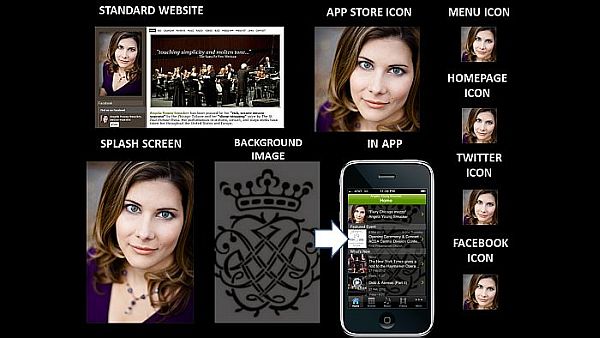
Mezzo-soprano Angela Young Smucker IS her brand.


VISAGE: For individual artists and ensembles, they are the brand.  Correspondingly, the brand is typically connected directly to their visage.  In the example above, mezzo-soprano Angela Young Smucker uses her headshot as a primary tool for building her brand recognition.

You'll notice that she uses a singular image as a graphical branding tool - for every icon, for every platform.  The constant and consistent use of this image provides for a strong fortification of her visual brand online and on mobile devices.

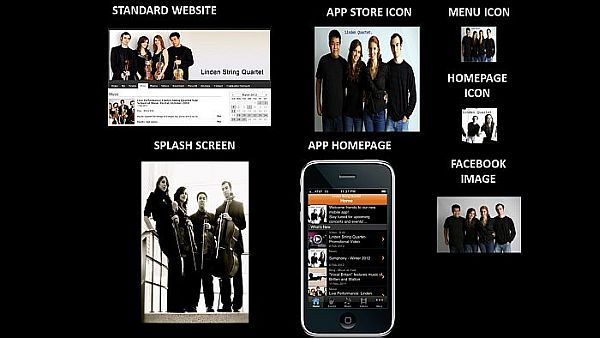
Linden String Quartet uses various images of the group members to strengthen their brand.


The use of multiple visage-focused graphics can also reinforce an artist or ensemble's visual brand.  In the example above, Linden String Quartet uses multiple images of the quartet members to fortify their brand.  In some of the images, they hold their instruments which plays more strongly on the musical nature of the brand.  Other images feature the ensemble in jeans and t-shirts which highlights their accessibility.

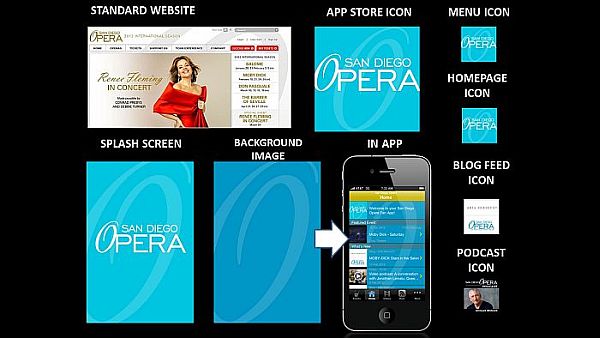
San Diego Opera builds its visual brand around the typographical design for the "O" in opera. 


LOGO:  Perhaps, the most common visual branding element for organizations is their logo, which may be an image, text, or a combination of the two.  For example, San Diego Opera has a primarily textual logo with the sole graphical departure being the "O" in opera, which has a different slant and font than the rest of the text.  While they often use the entire logo to brand the organization, a predominant emphasis is placed on the "O" for building brand recognition.  Even in the smaller icons for their mobile app, the signature "O" is the piece of the logo that remains the most recognizable.

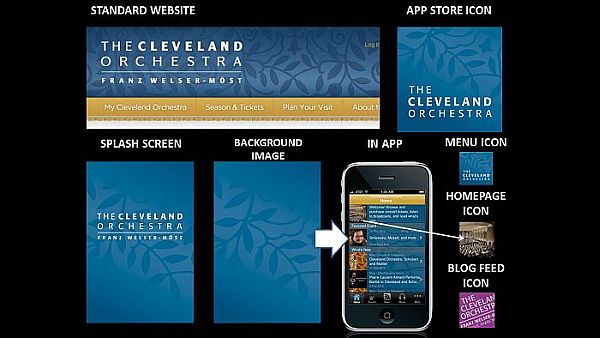
The Cleveland Orchestra uses a seemingly unrelated graphical element -- branches with leaves --
as the primary tool for visually branding the organization within its mobile app.


Sometimes the logo shows a direct relationship to the organization, as in the case of the San Diego Opera.  Other times, the logo pushes the viewer to make their own connections between the graphic and the organization.  If we look at The Cleveland Orchestra, we can see that they consistently use a silhouetted branch pattern in their visual branding.  As there is nothing particular about this branch pattern that connects directly to orchestral music or the city of Cleveland, viewers must create the relationship for themselves.  Interestingly enough, the consistent and repeated use of the graphic insists to the viewer that there IS a connection -- we just have to figure out what it is.

Okay, so what about their Homepage Icon?  This icon appears in the Welcome message area at the top of the Home page.  It also serves as the default icon for any content in the mobile which does not have an image associated with it.  In this case, The Cleveland Orchestra was already using their graphic and color (see next section) in the Background Image for the app - so they needed to use another image as the Home page so that the icon did not get lost.  They decided to use an image of the stage from the audience's point-of-view.  This is a great way of subtly reinforcing the app user's relationship to a live performance's audience.  Bravo!


COLOR:  As noted above The Cleveland Orchestra carries the colors established on its standard website into its mobile app as a branding element.  Another example of how color may be used for branding within the mobile app is Pacific Symphony.  Let's analyze the collage above from top left across and down to bottom right.

Pacific Symphony starts pulling color from their standard website into the header for their Tumblr blog along with the graphical and textual elements of their logo.  Then, they pull the color into a gradiated background for the app store icon which also features the logo's text in white as well as a silhouetted version of the logo's graphic.  This reappears in both the Menu Icon and the Homepage Icon.

They choose a lighter version of the background color and graphic silhouette for the app's Splash Screen, then they exchange the background color for a complimentary one in the Background Image.  Why?  With the Homepage Icon pulling the same color and graphic presentation as the App Store Icon and Menu Icon, they need a strong contrasting color that would allow them to continue to use the graphic element within the Background Image without it being too much for the eye.  It also provided them with another color that could be used in Blog Feed Icon to further differentiate where the content in the app is coming from while maintaining the organization's visual brand.

So as you build your online and mobile presence, consider your visual brand every step of the way.   What must stay consistent and where can you benefit from variation?  If you can master that, then your fans will always recognize your brand - wherever they may see it.

Sunday, February 26, 2012

What's New in the InstantEncore Control Panel?

Over the weekend, you may have noticed that the InstantEncore Control Panel has a new look and layout. Here is a brief walkthrough of some of the changes as well as new elements that have been added.

Expand the slideshow to full screen for optimal viewing.

Sunday, February 5, 2012

Announcing Two Streamlined Services for Engaging Web and Mobile Audiences

Artists know that their relationship with the audience is not limited to the performance on the stage. Today’s audiences want to learn more about the artists both before the performance and after the event.

Over the years, InstantEncore has developed a powerful system for artists and arts organizations to manage their online content and share it with their fans.  From news and event listings to streaming music and video, thousands of artists and organizations have used our system to give their audiences fantastic content.  Now, InstantEncore announces two streamlined services to help performing artists and organizations to connect and engage more fully with their fans.


  • InstantEncore FREE - a fast, easy and affordable tool allowing performing artists and ensembles to build their own professional websites without hiring a webmaster or knowing how to code. With IE FREE, artists can also connect their content with their social media accounts.


  • InstantEncore PRO - a multi-platform package allowing artists and arts organizations to engage mobile audiences with their own mobile website, iPhone app, AND Android app.  Additionally, artists and organizations using IE PRO gain access to our API, which allows them to pull content directly into their external websites.

To learn more about these services, take a tour of their powerful features, and view a showcase of our partners, visit www.instantencore.com.

In the upcoming weeks and months, we'll be sharing best practices for web and mobile strategy, spotlighting examples from the performing arts, as well as providing tips and suggestions keeping your audiences engaged.  If you have particular areas you'd like us to explore, send us your questions.